GDPR Configuration
Configure GDPR compliance, cookie consent, and privacy settings for your campaigns.
Firebuzz helps you comply with GDPR (General Data Protection Regulation) and other privacy regulations by providing built-in consent management for your campaigns.
What is GDPR Compliance?
GDPR is a European Union regulation that protects user privacy and requires explicit consent before collecting personal data or using tracking cookies. When enabled, Firebuzz displays a consent banner to visitors, allowing them to accept or reject cookies and tracking.
GDPR applies to any website that collects data from EU residents, regardless of where your business is located. Enabling GDPR mode helps you stay compliant with these regulations.
Accessing GDPR Settings
You can configure GDPR settings from the Campaign Overview panel:
- Open your campaign → FlowLanding PagesDataAnalytics
- Click anywhere on the canvas background to deselect all nodes
- The Campaign Overview panel appears on the right → scroll to GDPR Compliance
Enabling GDPR Compliance
The main GDPR toggle controls whether consent management is active for your campaign.
Enable GDPR ComplianceWhen enabled:
- A consent banner appears to visitors before tracking begins
- Visitors can accept or reject cookies
- Analytics tracking respects user consent preferences
- Essential functionality remains available regardless of consent
When disabled:
- No consent banner is shown
- All tracking and analytics are active by default
- Suitable for regions without strict privacy requirements
Disabling GDPR mode may put you in violation of privacy regulations if you serve visitors from the European Union or other jurisdictions with data protection laws.
Advanced Settings
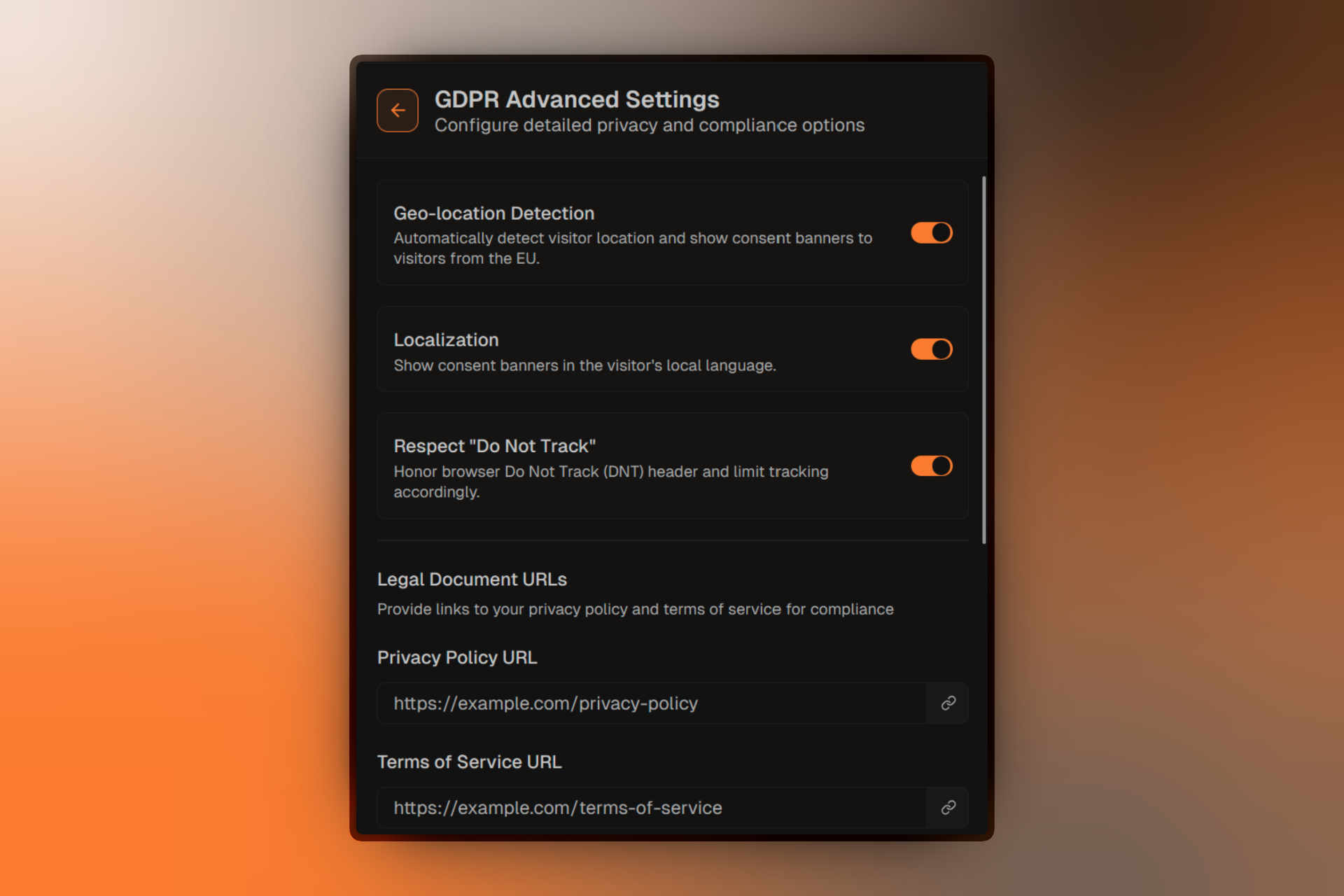
Click Advanced Settings in the GDPR Compliance section to access detailed configuration options.
Geo-Location Detection
Geo-location DetectionWhen geo-location detection is enabled:
- Firebuzz automatically detects the visitor's country
- The consent banner appears only for visitors from the EU
- Non-EU visitors see your landing page without the consent prompt
- You can include additional countries beyond the default EU list
When geo-location detection is disabled:
- The consent banner appears for all visitors worldwide
- Suitable if you want universal consent management
- Recommended for global compliance strategies
Enable geo-location detection to reduce friction for non-EU visitors while maintaining compliance for those who need it.
Localization
LocalizationLocalization automatically translates the consent banner into the visitor's browser language.
Supported languages include:
- English
- Spanish
- French
- German
- Turkish
When disabled, the consent banner appears in your campaign's primary language.
Localization uses the visitor's browser language preference (Accept-Language header) to determine the best language. If the browser language is not supported, English is used as the fallback.
Respect "Do Not Track"
Respect "Do Not Track"The "Do Not Track" (DNT) setting honors browser privacy preferences.
When enabled:
- Firebuzz checks the visitor's browser for the DNT signal
- If DNT is active, tracking is automatically limited
- The visitor is treated as if they rejected cookies
- Essential functionality still works
When disabled:
- The DNT browser setting is ignored
- Tracking behavior depends only on consent banner choices
DNT is a browser setting that users can enable to request that websites not track their activity. While not legally required, respecting DNT demonstrates good privacy practices.
Legal Document URLs
Provide links to your privacy policy and terms of service to help visitors understand how their data is used.
Privacy Policy URL: Terms of Service URL:These URLs appear as links in the consent banner, allowing visitors to review your policies before making a decision.
Make sure your privacy policy clearly explains:
- What data you collect
- How you use visitor data
- Third-party services you integrate with (analytics, marketing tools)
- How users can request data deletion
Country Targeting
When geo-location detection is enabled, you can include additional countries beyond the default EU list.
By default, the consent banner appears for visitors from all 27 EU member states. You can add additional countries like:
- United Kingdom (post-Brexit)
- Switzerland
- Norway
- California, USA (for CCPA compliance)
- Brazil (for LGPD compliance)
The EU country list includes: Austria, Belgium, Bulgaria, Croatia, Cyprus, Czech Republic, Denmark, Estonia, Finland, France, Germany, Greece, Hungary, Ireland, Italy, Latvia, Lithuania, Luxembourg, Malta, Netherlands, Poland, Portugal, Romania, Slovakia, Slovenia, Spain, and Sweden.
How GDPR Affects Analytics
When a visitor accepts cookies:
- Full analytics tracking is enabled
- Visitor behavior, conversions, and events are recorded
- Data appears in your Analytics tab
- A/B test assignments are tracked
When a visitor rejects cookies:
- Only essential functionality remains active
- Analytics tracking is disabled
- Conversions may still be recorded (depending on your setup)
- The visitor experience remains fully functional
Rejected cookies mean limited analytics data. If many visitors reject consent, your Analytics dashboard may not reflect actual traffic levels.
Best Practices
For EU-Focused Campaigns
| Setting | Recommended |
|---|---|
| GDPR Compliance | Enabled |
| Geo-location Detection | Enabled |
| Localization | Enabled |
| Respect "Do Not Track" | Enabled |
| Privacy Policy URL | Required |
| Terms of Service URL | Required |
This configuration ensures full compliance while minimizing impact on non-EU visitors.
For Global Campaigns
| Setting | Recommended |
|---|---|
| GDPR Compliance | Enabled |
| Geo-location Detection | Disabled |
| Localization | Enabled |
| Respect "Do Not Track" | Enabled |
With geo-location detection disabled, the consent banner appears for all visitors worldwide. This applies privacy best practices universally.
For Non-EU Campaigns
If you do not serve EU visitors and are not subject to GDPR:
| Setting | Recommended |
|---|---|
| GDPR Compliance | Disabled |
This removes the consent banner and enables full tracking by default.
Even if you believe you're not subject to GDPR, consider enabling consent management as a best practice. Privacy regulations are expanding globally (CCPA, LGPD, etc.), and user expectations around data privacy are increasing.
Consent Banner Customization
The consent banner that appears to visitors includes:
- A privacy-focused title ("We value your privacy")
- A brief explanation of cookie usage
- Accept All, Reject All, and Customize buttons
- Links to your privacy policy and terms of service (if configured)
The banner automatically detects your landing page's theme (light or dark) and styles itself accordingly. It appears as a non-intrusive overlay that doesn't block content.
Testing GDPR Settings
To test your GDPR configuration:
- Switch to Preview
- Open the preview URL in an incognito/private browser window
- Use a VPN or browser extension to simulate an EU location (if geo-location is enabled)
- Verify the consent banner appears correctly
- Test both Accept All and Reject All flows
- Switch to Production to verify settings don't affect production data
Use your browser's developer tools to inspect cookies and local storage to verify that tracking is properly disabled when cookies are rejected.
FAQ
Related Resources
- Campaign Settings — Configure goals, custom events, and other settings
- Publishing Campaigns — Go live with your campaign
- Analytics Overview — Track visitor behavior and conversions
- Custom Domains — Use your own domain for campaigns