Creating A/B Tests
Step-by-step guide to setting up A/B tests to optimize your landing page performance.
A/B tests help you find the best performing landing page for your audience. Follow this guide to create and configure your first experiment.
Prerequisites
Before creating an A/B test, make sure you have:
- A campaign with at least one segment
- At least two landing pages to test
- A clear hypothesis about what you're testing
Creating an A/B Test
From a Segment Node
- Select or hover over the Segment node where you want to run the test
- Click the button below the segment
- An A/B Test node is automatically created with two default variants
When you create an A/B test, two variants are automatically created: a Control and Variant B. Traffic is split 50/50 between them by default.
Configuring Your A/B Test
Select the A/B Test node to open the configuration panel.
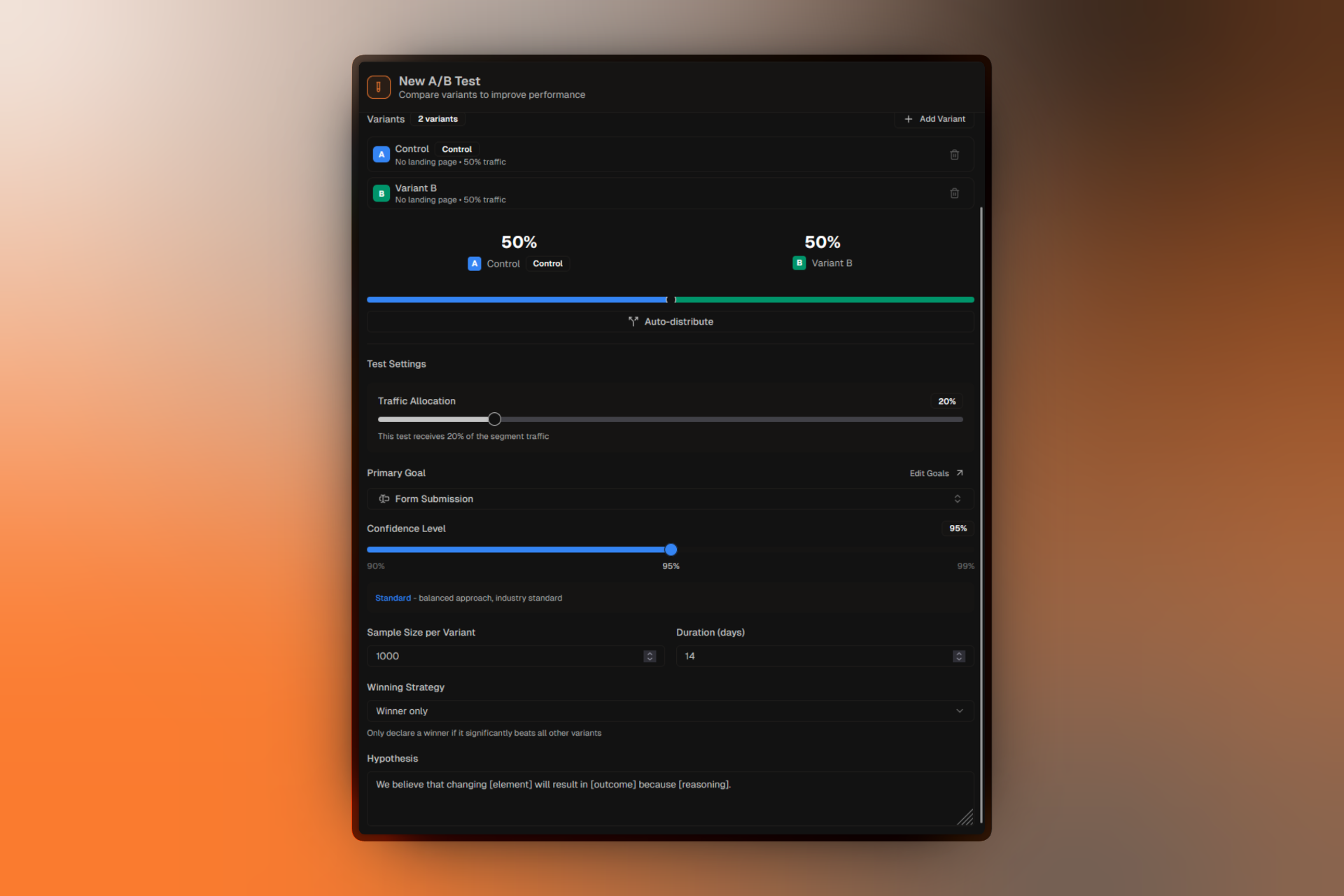
Basic Information
Title:Give your test a descriptive name that explains what you're testing.
Hypothesis:Document your hypothesis. This helps you and your team understand the test's purpose and analyze results later.
Example hypotheses:
- "We believe that a shorter form will increase sign-ups because users are deterred by too many fields."
- "We believe that a video hero will increase engagement because it explains the product faster."
Primary Goal
Select which metric determines the winner. Options include:
- Form Submission — Tracks form completions
- CTA Click — Tracks button clicks
- Social Share — Tracks sharing actions
- Custom Events — Your defined conversion events
Match your primary goal to your campaign type. Lead Generation campaigns typically use Form Submission, while Click Through campaigns use CTA Click.
Completion Criteria
Define when your test has collected enough data:
Sample Size per Variant:The number of conversions needed per variant before the test can be completed with statistical confidence.
Test Duration (days):Maximum time the test will run. The test can be completed earlier if sample size is reached.
Confidence Level
The statistical confidence required to declare a winner:
- 90% — Lower certainty, reaches significance faster
- 95% — Standard confidence (recommended)
- 99% — Higher certainty, requires more data
Pooling Percentage
Pooling Percentage:What percentage of segment traffic enters this A/B test (default: 20%).
- Lower (10-20%): Safer for risky tests, limits exposure
- Higher (50-100%): Faster results, more data collected
Starting the Test
Once your test is configured:
- Make sure all variants have landing pages assigned
- Review the configuration in the panel
- Click Start Test to begin
Starting a test requires your campaign to be in Published status. Draft and Preview campaigns cannot run active A/B tests.
What Happens When You Start
- Traffic starts being split between variants
- Data collection begins immediately
- The test status changes to "Running"
- You can view real-time results in the analytics panel
Managing Running Tests
Pausing a Test
Click Pause Test to temporarily stop the experiment:
- Traffic no longer goes to variants
- Visitors see the segment's primary landing page
- Collected data is preserved
- You can resume at any time
Resuming a Paused Test
Click Resume Test to continue the experiment:
- Traffic splitting resumes
- Data collection continues
- New visitors are assigned to variants
Completing a Test
When you're ready to end the experiment:
- Click Complete Test
- Review the results summary
- Optionally select a winner
Note: The system will suggest a winner based on statistical analysis, but you can manually choose if needed.
After Completion
Once a test is completed:
- Winner is displayed in the UI
- Full results remain accessible
- Test configuration is locked
- You can create a new A/B test in the segment
Applying the Winner
After completing a test, you can:
- Set the winning variant as the segment's primary landing page
- Start a new test to further optimize
- Keep the current setup and archive the completed test
Best Practices
Test One Thing
Change only one element between variants. Testing multiple changes makes it hard to know what drove the difference.
Document Everything
Write clear hypotheses and document what changed between variants.
Wait for Significance
Don't peek and make decisions early. Wait until your completion criteria are met.
Consider Seasonality
Run tests for at least a full week to account for day-of-week variations.